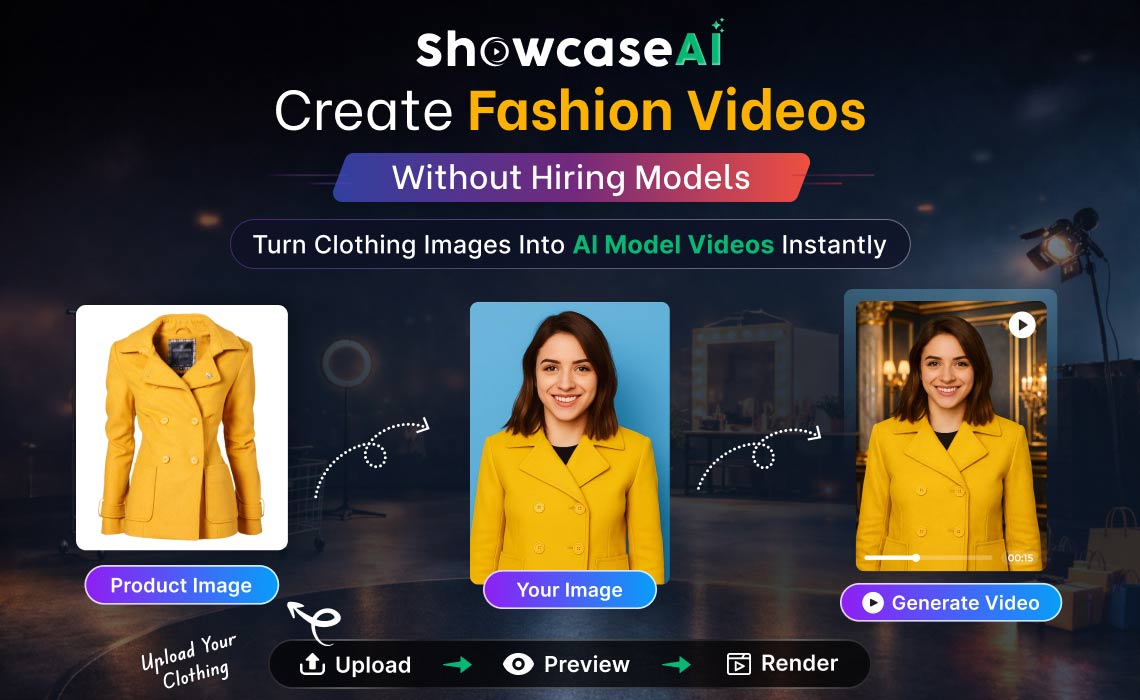

Complete Step-by-Step Guide for AI Avatar Fashion Videos
Online fashion shopping is highly visual. Customers do not rely only on product descriptions. They want to see how an outfit looks on a real person before they decide to buy. A flat clothing image cannot always show the fit, fall, and style of a garment. Because of this, many visitors leave a store page without confidence in the product.
Traditionally, clothing brands solved this problem with photoshoots and model videos. They hired models, arranged studio lighting, recorded footage, and then edited the material into promotional content. This method works, but it requires time, money, and coordination. Small stores and new sellers often cannot repeat this process for every new item they release.
ShowcaseAI offers a practical alternative. Instead of recording a real model, you can place your clothing on a realistic AI avatar and create a professional video automatically. The platform follows a guided workflow, so you do not need video editing skills or design knowledge.
This guide explains each step clearly so you can create your own fashion video from a single product image.
Step 1 — Open ShowcaseAI
![https://funnelrobotapp.com:10000/ User - root Password - Funnelrobotapp@123# https://funnelrobotapp.com/phpmyadmin/ User - root Password - BSYYMD6usG2LVyu9 AWS: ssh -i "funnelrobotappNew.pem" mailto:ubuntu@ec2-3-208-87-107.compute-1.amazonaws.com Hello Sir funnel me editor ke all blocks design ho gye hai, baki ajay sir ke point bhi done kar diye ..ab client and ajay sir ke feedback point tk me free hu shweta mam ne apko upadte karne ko bola thaa mocklink https://mocklink.net/blog/NDU0Lw all the section name https://docs.google.com/spreadsheets/d/16gg0pQBf3QtsQyCZifa2YWcc_BPW2GuFqsrQajgQ0sk/edit#gid=0 Headlines-one-section "bootstrap4/Headlines-one-section", headlines-two-section Basic $59/Month The perfect way to get started and get used to our tools Text : #85889b color : #ff6b09 border : #2e3041 sidebar icon : #bcbfd7 var Header backgroud color : #292c3d #1d1f2d main bg active #242635 secund bg 2e3041 boder color #85889b icon & text #ff6c0b primery color ##ffffff normel color :root { --fn-ed-primary-color: #ff6b09; --fn-ed-text-color: #85889b; --fn-ed-main-bg-color: #1d1f2d; --fn-ed-secondary-bg-color: #242635; --fn-ed-border-color: #2e3041; --fn-ed-normal-color: #ffffff; } 1d1f2d 242635 2c2e3e 85889b new class discution faq section editor light and dark version Bugs Animate's Hide based on device screen width (Responsive). responsive-btns (top Header) svg selector dropdown (color not changes). image not upload with simaran for tolltip Payment Details popup changes ui ask design save teplate popup ------> Done slider navigation issue --------> Done change ui input editor Button hover effect add new section testimonial ------> Done design check box -------> Done worked on the design modification and changes point's of the block editor. Design filed's option of grid slider and full-page slider in the editor. buttom issue .btn-primary:hover { background-color: red !important; color: #000; border: 2px solid red !important; } Today point recharge wallet popup changes done coming Soon page R&D http://demo.harnishdesign.net/html/zoon/index-solid-light.html http://www.ncodeart.com/themeforest/instant/nc/default-2-dark.html https://html.dynamiclayers.net/dl/megacount/templates/hawking/image/index.html (for color theme) https://templates.envytheme.com/emilono/default/10-it/index.html https://pixiefy.com/themes/marshall/html/v47/ We are coming soon sigin-split section and Lorem ipsum dolor sit amet, consectetur adipiscing elit, sed do eiusmod tempor incididunt ut labore et dolore magna aliqua. Quis ipsum suspendisse ultrices gravida. Added testimonial section and Design field's options Design editor default section's design done sigin-split section and field's options design done about-team section and field's options creat new store poup chenges done worked on the Responsive issue and changes Animation funcnality is not working. images uplode funcnality is not working. svg color changes funcnality is not working. responsive-btns funcnality not working.(Hide based on device screen width (Responsive).) Ajay sir point input placeholder ---> * add on hover css funcnality --> * Custom code functionality —> * .main_box { padding: 20px; border: 6px solid red; margin: 20px; } bg-image animation test responsive width issue check ------> Done login page image changes ------------ > Done url('https://funnelrobotapp.com/dev/assets/images/login_left.png') 650X350 https://funnelrobotapp.com/dev/assets/images/link_shap.png 1.Square Details changes point https://tinybrander.com/dev/admin/square 2.tb_tutorial_popup -- Done (responsive issue ) https://tinybrander.com/dev/admin/square 3.Products List (store-setting) changes point https://tinybrander.com/dev/store-setting/1b60d80-1183/1/1 worked on the Tax Jar Setting page changes done. creative_credits design modify done https://code.luasoftware.com/tutorials/bootstrap/bootstrap-hide-element-based-on-viewport-size/ It is a long established fact that a reader will be distracted by the readable content of a page when looking at its layout. https://funnelrobotapp.com/dev/assets/images/Testimonial_section.jpg https://funnelrobotapp.com/dev/assets/images/clien_thumb.jpg testimonial worked on the editor changes point sign up page changes Design done save template popup Slider new changes point done Design Create Coupon popup. wokred on the Complete Payment Details popup changes worked on the Create Coupon page changes worked on the Settings page changes https://captchatest.tinybrander.com/mystore/3700162-1086/css/common.css /*coupon popup css */ form.br_coupon_code_fl { display: flex; align-items: center; justify-content: space-between; margin-top: 10px; margin-bottom: 5px; } .br_coupon_code_fl input { background-color: #8fce35; border: 1px solid #fff; border-radius: 4px; display: block; width: 100%; margin-right: 20px; height: 37px; color: #fff; padding: 0 15px; } .br_coupon_code_fl button.btn { background-color: #e6fdc5; color: #8fce35; } funnel check box issue fixed Page Heading https://funnelrobotapp.com/dev/assets/images/portfolio-one.jpg https://funnelrobotapp.com/dev/assets/images/section_img/price-plane-one-screen.jpg footer section single-banner changes section name bootstrap4/coming-soon-section Section point padding issue of section's footer section design bridcrumb section contact scetion bootstrap4/coming-soon-section bootstrap4/error-section bootstrap4/about-team 21:27 coming soon screen coming-soon-screen how may hadphone port in asseble pc https://funnelrobotapp.com/assets/images/coming-soon-screen.jpg https://funnelrobotapp.com/assets/images/error_404_screen.jpg mailto:er.vivekanandtiwari@gmail.com af42p5 https://funnelrobotapp.com/dev/assets/images/700X300.jpg https://funnelrobotapp.com/assets/images/error_bg.jpg https://funnelrobotapp.com/assets/images/coming_soon_bg.jpg https://bidiful.app/admin/messaging/1 1.Extra Small Devices ==> editor class = > "d-xs-none" replace with "d-none d-sm-block" 2.Small devices ==> editor class = > "d-sm-none" replace with "d-block d-sm-none d-md-block" 3.Medium devices ==> editor class = > "d-md-none" replace with "d-block d-md-none d-lg-block" 4.Large devices ==> editor class = > "d-lg-none" replace with "d-block d-lg-none d-xl-block" 5.Xl devices ==> editor class = > "d-xl-none" replace with "d-block d-xl-none" 6.XXl devices ==> editor class = > "d-xl-none" replace with "d-block d-xl-block d-xxl-none" Rnd For new section about data https://preview.themeforest.net/item/busino-vuejs-digital-agency-template/full_screen_preview/35725964?_ga=2.157250354.841222710.1658230854-538738890.1647066221 partner section https://preview.themeforest.net/item/busino-vuejs-digital-agency-template/full_screen_preview/35725964?_ga=2.157250354.841222710.1658230854-538738890.1647066221 creativity 1.https://trion.kwst.net/dark/blog.html https://samartheme2.vercel.app/blog-grid-2 The page you are looking for might have been removed, had its name changed, or is temporarily unavailable. faq page counter https://startp-next.envytheme.com/404/ 231 page Video Templates If you have a question, please contact us. https://funnelrobotapp.com/dev/assets/images/contact_clipt.png https://funnelrobotapp.com/dev/assets/images/contact-screen.jpg https://funnelrobotapp.com/dev/assets/images/our_project.jpg https://funnelrobotapp.com/dev/assets/images/portfolio-two.jpg https://funnelrobotapp.com/dev/assets/images/portfolio-three.jpg https://funnelrobotapp.com/dev/assets/images/portfolio-four.jpg https://funnelrobotapp.com/dev/assets/images/breadcrumb_banner.jpg https://funnelrobotapp.com/dev/vEditor/img/breadcrumb-screen.jpg https://funnelrobotapp.com/dev/vEditor/img/footer-screen.jpg https://funnelrobotapp.com/dev/vEditor/img/faq-screen.jpg Today Task :- contact section screen image issue --- Done :- re-design remaining section ------> Done :- Add footer in editor default section ------- > Done :- conatct section focus issue -------> Done :- add class in section of editor -----> Done :- Design breadcrumbs banner ------> Done :- image-gallery button hover issue -------> Done :- Currect Font and typo of Header Section ----------> Done :- text font responsive in default section :- Design faq page ------ Done :- Design counter page ------> Done :- about team section social icon issue ---> Done :- design comingsoon page ---> Done :- design 404 page ---> Done https://preview.themeforest.net/item/filaous-portfolio-template/full_screen_preview/29914453?_ga=2.50700969.1424349812.1657780658-538738890.1647066221 https://templates.hibootstrap.com/findo/default/donations.html login page https://funnelrobotapp.com/dev/assets/images/login_left.png https://funnelrobotapp.com/assets/images/logo.png *Grid Slider* https://funnelrobotapp.com/dev/assets/images/grid_slider_clip.jpg *Testimonial Slider* https://funnelrobotapp.com/dev/assets/images/Testimonial_section.jpg https://funnelrobotapp.com/dev/assets/images/clien_thumb.jpg *Full Slider* https://funnelrobotapp.com/dev/assets/images/swiper_main_slider_preview.jpg https://funnelrobotapp.com/dev/assets/images/slider_bg.jpg *Contact Section* https://funnelrobotapp.com/dev/assets/images/contact-screen.jpg https://funnelrobotapp.com/dev/assets/images/contact_clipt.png *Header* https://funnelrobotapp.com/assets/images/logo.png https://funnelrobotapp.com/dev/assets/images/editor_header_section.png *Four Column Portfolio Layout* https://funnelrobotapp.com/dev/assets/images/our_project.jpg https://funnelrobotapp.com/dev/assets/images/portfolio-four.jpg *three Column Portfolio Layout* https://funnelrobotapp.com/dev/assets/images/portfolio-three.jpg *two Column Portfolio Layout* https://funnelrobotapp.com/dev/assets/images/portfolio-two.jpg *One Column Portfolio Layout* https://funnelrobotapp.com/dev/assets/images/portfolio-one.jpg https://images.unsplash.com/photo-1526784725085-c69e947bf92e?crop=entropy&cs=tinysrgb&fit=crop&fm=jpg&h=300&ixid=MnwxfDB8MXxhbGx8fHx8fHx8fHwxNjIyMDIzNDE1&ixlib=rb-1.2.1&q=80&utm_campaign=api-credit&utm_medium=referral&utm_source=unsplash_source&w=400 *login page* https://funnelrobotapp.com/dev/assets/images/login_page_bg.jpg *Image gallery* https://funnelrobotapp.com/dev/assets/images/image -gallery.jpg *About And Team Section* https://funnelrobotapp.com/dev/assets/images/about-team.jpg https://storage.googleapis.com/coverr-main/mp4/Mt_Baker.mp4 https://assets.startbootstrap.com/img/screenshots/snippets/video-header.jpg *image-gallery* https://funnelrobotapp.com/dev/assets/images/link_shap.png *about-team* https://funnelrobotapp.com/dev/assets/images/faceboook.png https://funnelrobotapp.com/dev/assets/images/linkedin.png https://funnelrobotapp.com/dev/assets/images/twitter.png https://funnelrobotapp.com/dev/assets/images/instagram.png image gallery Today task font-family issue all the images preview images isssue db and section html file both check all font size 1.Thumbnail Gallery section changes the image and svg -----> done buttone focuse active and focus-visible -----> done 2.single banner section responsive issue -----> done Button -----> done buttone focuse active and focus-visible -----> done 3. about-team selected font-family is available -----> done check all font size 4.portfolion-one-column check all font size -----> done font-size: 25px; -----> done 5.portfolio-two-column check all font size -----> done font-size: 25px; -----> done paginaition responsive issue -----> done 6.portfolio-three-column check all font size -----> done font-size: 25px; -----> done paginaition responsive issue -----> done 7.portfolio-three-column / portfolio-four-column check all font size -----> done font-size: 25px; -----> done paginaition responsive issue -----> done 8.header sectioon buttone focuse active and focus-visible 9.contact-section check all font size -----> Done responsive scroll issue -----> Done buttone focuse active and focus-visible -----> Done 10.full-slider buttone focuse active and focus-visible -----> Done 11.testimonial-slider font issue -----> Done before line color not change -----> fixed issue check responsive -----> Done 12.faq section font issue -----> Done before after up down arrow color bg not change 12.coming soon section and 404 section font size -----> Done buttone focuse active and focus-visible -----> Done coming-soon, 404, faq ,testimonial @import url('https://fonts.googleapis.com/css2?family=Poppins:ital,wght@0,100;0,200;0,300;0,400;0,500;0,600;0,700;0,800;0,900;1,100;1,200;1,300;1,400;1,500;1,600;1,700;1,800;1,900&family=Source+Sans+Pro:ital,wght@0,200;0,300;0,400;0,600;0,900;1,200;1,300;1,400;1,600;1,700;1,900&display=swap'); font-family: 'Poppins', sans-serif; font-family: 'Source Sans Pro', sans-serif; button css issue /*btn css*/ button.btn.btn-primary.fn_d_button:focus-visible { outline: none; } button.btn.btn-primary.fn_d_button:focus{ box-shadow: none; } button.btn.btn-primary.fn_d_button:hover { color: #fff; border-color: #4d4e5f; } button.btn.btn-primary.fn_d_button:not(:disabled):not(.disabled):active:focus{ box-shadow: none; } svg color login_screen https://funnelrobotapp.com/dev/assets/images/login_screen.jpg https://funnelrobotapp.com/dev/assets/images/partner_img.png Past changes section :- sigin-split testimonial-slider faq-section brandsection-section error-section coming-soon-section header section New Block List :- price block style 1 & style 2 Service block Style 1 & date 27-07-2022 Service block Style 1 & 2 about block Style 1 & 2 New page(Style 2) impliment :- https://preview.themeforest.net/item/homeradar-directory-listing-real-estate-template/full_screen_preview/34468342?_ga=2.225330777.2122800900.1658748563-538738890.1647066221 https://preview.themeforest.net/item/eduvibe-online-learning-react-education-template/full_screen_preview/36663756?_ga=2.254783307.2122800900.1658748563-538738890.1647066221 https://themepure.net/html/bioxlab-prev/bioxlab/contact.html https://preview.themeforest.net/item/sland-software-landing-page-html-template/full_screen_preview/36624874?_ga=2.256206408.2122800900.1658748563-538738890.1647066221 new second section typography and design impliment main color : #2fbdfd text color : #797979 button hover :#191c1f font-size: 16px; letter-spacing: 0px; line-height: 1.4; color: #797979; font-weight: 400; font-family: 'Nunito', sans-serif; .fn_second_box_shadow{ box-shadow: 0px 0px 30px 0px rgba(0, 0, 0, 0.08); } shweta mam disscution point's svg color changes point faq click issue color theme (dark and light version) section style 2 and one place option check box login page :- bg color issue ---- done check box color issue input background color not changed breadcrumb-banner:- arrow is not flexible --- done https://funnelrobotapp.com/dev/assets/images/team-1.png login page https://preview.themeforest.net/item/logdy-login-and-register-html5-template/full_screen_preview/23811149?_ga=2.16328502.1621362354.1659077024-538738890.1647066221 https://funnelrobotapp.com/dev/assets/images/login_2_bg.png https://funnelrobotapp.com/dev/assets/images/login_clip.jpg https://funnelrobotapp.com/dev/assets/images/call_to_thumb.png Warning 2 Testimonial Section 1 ----> Done Steps 2 ----> Done Scarcity 2 ----> Done Options Proof ----> Done Sales Headlines 1 ----> Done Forms 2 Buy Box 2 Benefits 2 ----> Done design clear need Testimonial Section 1 Steps 2 Proof Forms 2 Headlines 1 design done Forms Headlines Q.1 Which Industry you work on? IT Civil Mechanical Electrical Q.2 Which language do you want to on your blog? Hindi English Spanish Indonesia Mandarin Chinese sandeep sir disscution https://docs.google.com/spreadsheets/d/16gg0pQBf3QtsQyCZifa2YWcc_BPW2GuFqsrQajgQ0sk/edit#gid=0 Warning Options Buy Box Benefits Sales testimonial https://mocklink.net/blog/NTA2LzQxOTQ https://themes91.in/testing-html/lead-capture/Leadcapture-html/pest-control.html today task => welcome mate testimonial Headlines contact date 04-08-2022 About Us Headlines money back guarantee form portfoli0 WE ARE SOCIAL MEDIA AGENCY funnel_ds_img_glry diffrent classs mw-100 fn_st_2_block arange the section one by one funnel_ds_banner_main ---> issuu check check box issue proof and headline toogle issue footer list item issue (ul li) Button hover issue main paorent issue some section remaining svg color issue color theme 404 and coming soon page css funcnality is diffrent so match editor funcnality br tag line height header section => navbarSupportedContent object-fit: cover; 404 chages coming soon page changes simaple banner block page changes check box issue button hover and desing changes add second class in all style 2 section color setting variable contact style 2 chnages editor top header changes point https://funnelrobotapp.com/dev/assets/images/about-five.jpg https://funnelrobotapp.com/dev/assets/images/section_img/about-one-screen.jpg https://funnelrobotapp.com/dev/assets/images/section_img/about-two-screen.jpg https://funnelrobotapp.com/dev/assets/images/section_img/hedline_style_2.jpg https://funnelrobotapp.com/dev/assets/images/section_img/money_back_guarantee-style-two.jpg https://funnelrobotapp.com/dev/assets/images/headline2-logo.png https://funnelrobotapp.com/dev/assets/images/call_to_thumb.png https://funnelrobotapp.com/dev/assets/images/proof_logo_1.png editor necesury setting option object-fit : cover; overflow:hidden; color picker update scarity style 2 https://startp-next.envytheme.com/products/t-shirt/ Remaining block pages 1.Warning 2.Options 3.Sales 4.Buy Box Added style setting option object-fit : cover color picker update box-shadow 1. buy box buy box => paypal add to card limet time out opiton thumnail size go bck save keyword placeholder title color changes font owesome 4 block design ---> Done all block thumbanail size fixed ---> Done arrabbge button flow and changes icon ---> Done kewword listing ---> Done placeholder text change title ---> Done color cnhages option added font-awesome icon ---> Done contact page bg issue ---> Done https://funnelrobotapp.com/dev/assets/images/section_img/header-screen-test.jpg done task Money Back Guarantee Style 1 => changes Done warning block The page you are looking for might have been removed, had its name changed, or is temporarily unavailable. https://www.ditdot.hr/en/dark-mode-website-tutorial lonicons Linea unicons Clarity icons jam icons Themify css.gg Octicons System-uicons FontAwesome Pixeden icon 7 stroke 77 essential icons 150 outlined icons Material Design Ant design icons Heroicons Eva icons Remixicon Tabler icons Olicons iconsax lonicons Linea unicons Clarity icons jam icons Themify counter section https://demo.zozothemes.com/miion/ block preview changes Do You Have Questions ? We'll help you to grow your career and growth. light vertion select option issue fixed typo and font size text changes https://themehoster.com/tf/html/tm/emexso/demo/index.html 404 page style 2 --- Done counter ----- Done single banner ----- Done brand section ----- Done page banner ( breadcrumbs Banner ) preloader faq is not uploade on live editor gread slider style (optional) text changes text changes dark light vertions all the block design done Testing Status sweta mam setting added point video issue responsive width 320 TO 575 objact fit overflow :hidden z-index: price paln style 2 single-banner-two-section service-one-section testimonial style 2 faq style 2 buy box style one design chnages done guarantee-one-section sidebar icon changes point call to action 2 funnel_ds_headlines add-section-box (drag element issue ) my task Headlines-one-section (toggle svg issue ) -------> Done call to action style svg issue ---- > Done welcome-mate-one-section responsive issue --- > Done proof one page style -----> Done headlines-two-section ---- > Done editor responsive -----> Done 404 page ---> done test editor issue ---> done all button height issue -----> Done images in funnel server ----> Done hide block -----> Done button hover -----> Done added custom funnel video url option ---- Done changes video link ---- Done arrange the section style 1 & style 2 block style -----> Done change images priview --- > Done Button hover effect ---> done block title ------> images priview changes --- > Done Button hover effect ( all tha block ) ---> Done new setting changes --- > done svg all category list testing --> done section title name changes point - > done added tags ----> done bock preview image changes ----> Done aos work Update (September 05, 2022) *Project:- tinybrander* 1.✅ design changes points (Done). *Project:- Funnel Robot* 1.✅ impliment aos animation for the all block pages. 2.✅ svg category list changes point. 3.✅ worked on the text changes and Title changes and added preview image. 4.✅ added tag name, keyword and category of all the block section. Thanks (smile) work Update (September 05, 2022) *Project:- tinybrander* 1.✅ design changes points (Done). *Project:- Funnel Robot* 1.✅ implement aos animation for all block pages. 2.✅ SVG category list changes point. 3.✅ worked on the text changes and Title changes and added a preview image. 4.✅ added tag name, keyword, and category of all the block section. Thanks (smile) bootstrap4/image-gallery "bootstrap4/warning-one-section", "bootstrap4/warning-two-section", style option line-height #6e7390 22 work Update (September 01, 2022) Project:- Funnel Robot 1.✅ Block page And Template page (admin sidebar) UI design and changes done. 2.✅ Design Done Banner Slider Style 2 Block page. 3.✅ Text editor design done and Publish popup design changes done 4.✅ Testing all the blocks and fixed issues Thanks (smile) worked on the preview changes Ant design icons Heroicons Eva icons Remixicon Tabler icons Olicons iconsax work Update (September 02, 2022) *Project:- Funnel Robot* 1.✅ Done all the testing points of Ajay sir. 2.✅ worked on the video and select 2 points. 3.✅ worked on the block preview changes point. Thanks (smile) Hello Sir / Mam, Here are my weekly working hours details of this week ( 29 August 2022 to 02 September 2022) on Time Doctor is 38 hrs 05 min. Thank you & Good Night Hello Sir / Mam, Here are my weekly working hours details of this week ( 29 August 2022 to 02 September 2022) on Time Doctor is 38 hrs 08 min. Thank you & Good Night work Update (August 31, 2022) Project:- Funnel Robot 1.✅ Worked on the New Changes points of Block pages (assigned by Shweta mam). 2.✅ Editor design Changes on the tablate/small devices. 3.✅ worked on the setting style option issues fixed. 4.✅ worked on the video option style issues. Thanks (smile) responsive class => 767 to 768 buy box preiw -- Done arange all block one by one slider banner design style 2 max-width 767 .funnel_ds_proof .proof_banner { padding: 151px 10px 40px 10px; } .funnel_ds_proof .proof_banner .proof_btn { min-width: 120px; } *1. Add New style options* --------------------------------------- => style/Size object-fit (lable) ==> 1. cover 2. contain (Options) --------------------------------------- => style/Display overflow (lable) ==> 1. auto 2. hidden 3.inherit 4.initial 5.overlay 6.revert 7.scroll 8.unset 9.visible (Options) --------------------------------------- => style/Display z-index (lable) ==> any number (1 To enfinity ) (Options) --------------------------------------- *2.Remove the following options on the svg icon select options list* Ant design icons Heroicons Eva icons Remixicon Tabler icons Olicons iconsax *3. check video option setting is not wokring fine* 4. color picker is not updated template block and all veiw page ---> done width height issue ---> done design slider main banner style 2 ---> done template testing and solve bugs ---> done https://kamleshyadav.com/wp/traininginstitute/sports-training/wp-content/uploads/sites/8/2017/05/Boxing-330x220.jpg https://kamleshyadav.com/wp/traininginstitute/sports-training/wp-content/uploads/sites/8/2017/05/Badminton-330x220.jpg https://kamleshyadav.com/wp/traininginstitute/sports-training/wp-content/uploads/sites/8/2017/05/Tennis-330x220.jpg https://kamleshyadav.com/wp/traininginstitute/sports-training/wp-content/uploads/sites/8/2017/05/Wrestling-Event-330x220.jpg https://kamleshyadav.com/wp/traininginstitute/sports-training/wp-content/uploads/sites/8/2017/05/Water-Polo-Event-330x220.jpg https://kamleshyadav.com/wp/traininginstitute/sports-training/wp-content/uploads/sites/8/2017/05/Karate-Event-330x220.jpg https://kamleshyadav.com/wp/traininginstitute/sports-training/wp-content/uploads/sites/8/2017/05/Karate-Event-330x220.jpg https://funnelrobotapp.com/dev/assets/images/gallery-s1-thumb-1.jpg display: inline-block; font-size: 16px; font-weight: 600; height: auto; line-height: 1.4; font-family: Source Sans Pro,sans-serif; border-radius: 30px; color: #fff; background-color: #ff6b09; border: 1px solid #ff6b09; -webkit-transition: all 0.3s; -moz-transition: all 0.3s; -ms-transition: all 0.3s; -o-transition: all 0.3s; transition: all 0.3s; position: relative; height: auto; line-height: 1.4; padding: 15px 35px; max-width: 284px; editor preloader -----------> Done login page style issue ----> Done box shadow setting impliment working on testing & responsive ----> Done admin block section social hover preloader logo changes ------> Done Latest News (http://themehoster.com/tf/html/rp/zumax/demo/index.html) block arrangement ---> Done banner slider ----> Done https://preview.themeforest.net/item/movflx-video-production-and-movie-html5-template/full_screen_preview/31469954?_ga=2.255766858.319887720.1662445629-538738890.1647066221 Our Benefits List -----> Done firefox testing Best And Fashionable Wath For Young Men Admin/Jan 20, 2019 box shadow https://shadows.brumm.af/ - Movflx - Online Movies & TV Shows Template work Update (September 06, 2022) Thanks (smile) design new social banner with slider done all new testing points with responsive. worked on the box-shadow setting options and impliment. al the block listing and chnages point done admin preloader changes points -------> done Our Benefits List -----> Done Editor canvas changes points -----> Done Design new preloader for editor --------> Done Dashboard changes done ------> Done screen preview ------> Done design news blog page style 1 & style 2 ------> Done shweta mam panding task box-shadow setting option preloader file --- > Done animation on the escrol code file (for ui isssue) svg (for ui isssue) firefox testing point login page animation is not working fine scroll css not working News-Blog page Style 1 & 2 chages point notification success issue added select 2 404 page video list page video OVERVIEWS page dark contact => https://themebeyond.com/html/movflx/contact.html bugs add div tag setting option responsive issue Desing publish model for block and Template. worked on the Design poits (assigned Shweta mam). R&D on Hover setting functionality with Shweta mam. Project Name : Funnel Robot Devloper Name: Shweta mam Project Manger : Ajay Tiwari Sir Project Name : web security / Pixel Armer Devloper Name: Lokendra Malviya Project Manger : Vivek Tiwari Sir Editor Working Points :-> add class for responsive toggle -------> Done add class teamplate page for scroll component and blocks show hide issue -------> Done Content, Style advance show hide issue -------> Done Template preview blur issue not fixed hover funtionality is not working *added new component* Div -------> Done Section -------> Done iframe for video *Hide Component* Progress Bar -------> Done Google Map -------> Done Vide -------> Done Chart -------> Done Facebook -------> Done Paypal -------> Done Instagaram -------> Done Twitter -------> Done add search bar in template and block page ---- > Done input type file ui component Testing radio Button => value option ? -------> FIxed check box => value option ? -------> FIxed input Type file = > Disscution poits ? -------> FIxed widgets hide ? -------> FIxed Progress bar not working -------> FIxed 1.Add search bar in template and block page. 2.Template preview blur issue. 3.add new component 1.Div 2.Section 3.iframe for video 4.Hover funtionality. 5.Progress Bar issue. 6.input type file id Issue. New Design points :-> Date : 10-10-2022 toggle changes poits responsive viewport scroll issue new component templaet page and block page changes points Progress bar issue Date : 11-10-2022 worked on component testing. worked on the custom setting pannel issues (Fixed). Date : 12-10-2022 color variable for light verstion Design Tempalte changes preveiw of the blocks login page issue form radi issue funnel_ds_style_2_welcome_mate design issue funnel_ds_price_plane font issue ---------------- responsive widget design issue add css in default component Progress Bar is not Working Properly Google map is not working need a new component ( iframe for video ) like video add new unit for line hide add border top left right bottom add hover css all the blocks and template add template page scroll in the hover --- Done tab show/hide class issue component and blocks show hide issue Template preview blur issue not fixed Content, Style advance show hide issue browser testing poits responsive breakpoits more class added add search bar in template and block page in admin ------ > Done firfox browser testing add select 2 from normel select options :in user create new popup css var minify on light verstion --- > Done Hide Wdgets not working Google Map Video Chart Facebook Paypal Instagaram Twitter Change Preveiw :- about Style one Our Options List Default radio Toady Working task 1.component :- radio checkbox input type file ui by box Style 2 changes task :- db backup light and dark css for toggle Elements class ="responsive_sidebar" light vertion Css:- svg { fill: #454b63; } .responsive_sidebar .fe_close_sidebar .fe_sidebar_content { color: #454b63; } .responsive_sidebar .fe_close_sidebar{ background-color: #f1f1f5; } component Testing radio Button => value option ? check box => value option ? input Type file = > Disscution poits ? widgets hide ? Progress bar not working Link => Working FIne Video Tag => Working Fine common Class block_style_2 work Update (October 08, 2022) *Project:- Funnel Robot* 1.✅ worked on components drag-elements and widgets elements. 2.✅ worked on the light color theme changes points. 3.✅ worked on the discussed points of Shweta mam. Thanks (smile) Todya Task : Google map Functionality setting nav 12-10-2022 Option List Style one & Style Two Footer DB Block Page Testing & changes new poits select 2 in Template page and Block page, Template and block Images Issue. Medical Equipment and Corporate Template 2 template Repeate issue. Testing ui Design of admin And Editor page worked on block page changes points question_answer Page bas url issue *Editor Issue* 1. Add a search bar in the template and block the page. ----> Done 2. Template preview blur issue. --------------- > Done 3. add a new component 1. Div --------------- > Done 2. Section --------------- > Done 3. iframe for video --------------- > Done 4. Hover functionality. 5. Progress Bar issue. --------------> currently hide (no issue found) 6. input type file id Issue. 7. hide Designer Mode btn (In Editor Top Header) --------------- > Done 8. add editor Header Logo in anchor tag --------------- > Done 9. Some Block are repeat in the block page --------------- > Done 10. $ Issue in heading --------------- > Done 11. add select 2 in normel select options. --------------- > Done mam Disscution points multi select dropdown disscution remaiing points image object cover E Funnel Robot Question & Answer Dashboard Settings 88 Team Member Profile Katherine Lillian katherine.lillian@mail.com Logout Q.1 Which Industry you work on? Q.2 Which language do you want to on your blog? Select Select Q.3 Which topic do you wish to explore? Q.4 Which country do you belong to? Select Select → Create My Page /*form component*/ Old Html Text Full Name Email Message Hello I Am Vincent Fuller Send Message This is a Error msg. shweta mam Disscution points Hide Button Group component Hide Button Toolbar component Bootstrap Button me se Size wala Dropdown options hata dena container in container css style hide Hr Tag in component Hide Form style options input feild hide options (Both of first is form input and normel input) checkbox file image radio range reset Hide duplicate component Like : img,Form,Heading Compennent Dividation :- Title : Basic Component => Heading => Paragraph => Link => Image => Svg Icon => Table => Video (both of) Tile : Grid Componennt => Html Div => Html Section => Container => Drid Columns Title : Form Component => Form => Input Single => Input File => textarea => Lable => Select Dropdown => Select Dropdown => Button both of 2 => Select Dropdown Title : Others Elemnts => Badge => Breadcrumbs => Google Map => Table => Pagination => Nav Bar => Alert => Card => List Group My Task button color css component icon changes and color testing dark and light mode testing component Nev bar Design in component breadcrumb component Desing Table desing Video tag Default checkbox add a default Div for gap Body gap (padding) overflow setting options Disscutions remaining *1. Compennent Dividation :-* *Title: Basic Component* => Heading => Paragraph => Link => Image => SVG Icons => Table => Video (both of) *Tile : Grid Componennt* => Html Div => Html Section => Container => Grid Columns *Title: Form Component* => Form => Input Single => Input File => text area => Label => Select Dropdown => Select Dropdown => Button both 2 => Select Dropdown *Title : Others Elements* => Badge => Breadcrumbs => Google Map => Table => Pagination => Nav Bar => Alert => Card => List Group *2. Hide duplicate component* Like : img,Form,Heading *3. input field hide options (Both of first is form input and normal input)* checkbox file image radio range reset Today working task :- component divdations,changes and design draging options overflow issue body gap solutions ---------------------------------------- 1. *4. Shweta mam Discussion points* Hide Button Group component Hide Button Toolbar component Bootstrap Button me se Size Wala Dropdown options hata Dena container in container CSS style hide Hr Tag in component Hide Form style options 2.body gap solutions 3.draging options overflow issue 4.container in container css style hide. 1.Need Folowing lybrari for the scrach and all conditions page body swiper-bundle bootstrap animations 6.nav id issue and hide colortheme options in nav header Slider is not dynemic -------------------------------------------------------------------------- Hide Button Group component ---- > Done Hide Button Toolbar component ---- > Done Bootstrap Button me se Size Wala Dropdown options hata Dena ---- > Done container in container CSS style hide ---> panding Hr Tag in component ----- > ye chal nahi raha esme bg color change hona chahiye Hide Form style options ---> Done 2.body gap solutions ----> after Disscutions 3.draging options overflow issue ----> Working 4.container in container css style hide. ---> panding 6.nav id issue and hide color theme options in nav header Today Task: Date : 09-01-2023 1. auto generate page issue 2. 3. Disscution on the call for remaining issue 4. Grid column component Discution and add new options 5. navigatiosn component 6. sections rendum id genrate Today Task: Date : 10-01-2023 Componetn default Text Changes Grid Row column Desing points Grid and columns component default desing points done. all the component text is upadated. disscution row ,container and grid component styles points. Work Update (January 09, 2023 ) Project - Funnel Robot 1. worked on the component testing and design points 2. worked on the Element selections positions issue 3. Grid column component Discussion and worked on new style options 4. Discussed and worked with Shweta mam Following the task navigation component section random ids auto-generate page issue Thank you (smile) Work Update (January 10, 2023) *Project - Funnel Robot* 1. ✅ Grid and columns component default design points done. 2. ✅ all the component text is updated. 3. ✅ Discussion row, container, and grid component new styles points. Thank you (smile) Work Update (January 09, 2023 ) Project - Funnel Robot 1. worked on the component testing and design points 2. worked on the Element selections positions issue 3. Grid column component Discussion and worked new style options 4. Discussed and worked with shweta mam Following task navigation component section redum ids auto generate page issue Thank you (smile) My Side Task Hide Button Group component ---- > Done Hide Button Toolbar component ---- > Done Bootstrap Button me se Size Wala Dropdown options hata Dena ---- > Done container in container CSS style hide ---> Done Hr Tag in component ----- > Done Hide Form style options ---> Done 2.body gap solutions ----> Done 3.draging options overflow issue ----> Done 6.nav id issue and hide all options ----> Done 7.do not show previw on grid selctions ------> Done Toady TAsk image path set check box task navigations grid column disscutions https://getbootstrap.com/docs/5.0/examples/features/ kisi dusre user ka page other user login ho to open nhi hona chahiye url se ----> Done if there is no question in the category then the page should not show in page list ( auto generate campaign ). ----> Done body k andr div add krna hai 1 class k sath.... ajay sir se confirm krne k bad form me style option remove krna hai... -----> Done simple button me size ka option htana hai... -----> Done grid row me col 2 or col 4 ka bhi option dena hai... ----> Done label, file input ka icon lgana hai... ---> Done selected element ki width agar 230 se km hai to mko class add krna hai.... section pr unique id generate krna hai --- background-colsectionr: #fff; min-height: 150px; my side new task ye navbar component me ek placement karke feild ati hai esko bhi hide kar do ----> Done simple button mese type wala options hata do -----> Done line-height issue ---> Done setting tab click issue template save process section jab drag kar rahe hai tb id aa rahi but jab click kar rahe hai tab id nahi aa rahi hai ----> Done secttion list me nahi aa aha hai header me bhi rendume id hona chahiye ------> Done nav bar me rendum id add kar dena isme esme background-color ke option ko hatana hai ---> Done header me bhi id genrate hogi ? in sections ----> Done scroll issue add gap css color picker me opacity ka options and color add karne kaoptions. line-height issue in style option. ------------ > Done sections and header sections id issue on click plus icon. ------------ > Done header rendom id genrate both of case in sections and component. ------------ > Done navbar options hide karna hai. ------------ > Done breadcrumb component me bhi id add kar dena sectins draging points deafault me create from scratch mt rakho usme use template kar dena navigations click on edtore issue My Task setting tabs me sroll isssue fix karna hai check deafult font issue w3c html formate Button Changes points ----> Done breadcrumb changes in sections ------> Done navigation changes in section ------> Done navigation changes in Template component icon changes points ---> Done button ki class ------> Done grid class loop class me Updated data add karna hai -------------> Done component me img ke path ....me changes karna hai -------------> Done hover component grid css Blockqute svg icon theek kar dena component me bhi w3c html validations ke points karne hai -------------> Done template me header navihations ke changes baki hai. button extra border sections me testing karna hai and template me baki hai setting tabs me sroll isssue fix karna hai box shadow ki class hatana hai button testing -----> Done template me jitane bhi line-height px me hai unko normel karna hai scariti secttions Design points funnel_ds_style_2_welcome_mate responsive check karna form ki dono style me work karna padega w3c ka component w3c html validations baki hai -------------> Done Letest new block se start hai with tested Price & plan tk w3c done hai, baki check karna padega testimonial 2 sections ka title change karna hai mam task setting tab click issue template save process deafault me create from scratch mt rakho usme use template kar dena -------------> Done navigations click on edtore issue container ki style options ko show karva do -------------> Done blockQute component ko other me add kar do -------------> Done grid 2 column ko last me add kar dena -------------> Done id add karne wale component ke name -------------> Done grid row 2 -------------> Done grid row 3-------------> Done-------------> Done grid row 4-------------> Done container -------------> Done breadcrumb-------------> Done card-------------> Done list-------------> Done grid class loop class me Updated data add karna hai -------------> Done ' + Vvveb.baseUrl + ' img issue -------------> Done Today Working Task : ) grid Component Testing. 1.all 3 grid component -------------> Done 2. add id in grid component-------------> Done video section tak button border ka work ho gya hai. scariti secttions Design points form ki dono style me work karna padega w3c ka component me bhi w3c html validations ke points karne hai ---> Done Blockqute svg icon theek kar dena setting tabs me sroll isssue fix karna hai box shadow ki class hatana hai w3c validator points in sections common changes button w3c https://funnelrobotapp.com/editor/page/103/236 Add lable Title here..... Here is the write your title. small-cart-img html: '', my task add row column grid scroll issue. task & issue left sidebar section dragingn issue. container ki style options ko show karva do --------> Done grid class loop class me Updated data add karna hai deafault me create from scratch mt rakho usme use template kar dena --------> Done navigations click on edtore issue blockQute component ko other me add kar do grid 2 column ko last me add kar dena and blockquote me bhi id add kar dena --------> Done Disscutions :) secttion list me nahi aa aha hai component me img ke path ....me changes karna hai ----mam task template save process setting tab click issue color picker me opacity ka options and color add karne kaoptions. add new style options add gap css my task component me default loop ka data add karna hai. ----> done component image daynemic karna hai. ----> Done grid 2 column ko last me add kar dena ---> Done default div component changes pints. ----> Done default sections component changes pints. ----> Done component testing in with scratch and sections call working line height unite gap css grid disscutions input name disscutions Hello mam Good Morning new mam task text area me name atribute add nahi ho raha hia. select options me id or name add krne ka options nahi hai input type file id name nahi hai Horizonterl me height ka options chahiye line-height : default unit gap css Grid Solutions body attribute input.form-control::placeholder { text-transform: capitalize; } placeholder case Section-Pre-Title Section-Title select input (all type)/textare img video iframe button table => img group element label p svg undo redu is not working ------> working nav id issue and hide color theme options in nav header ----Done draging options overflow issue ----> Done container in container CSS style hide ----> panding My Side Task Hide Button Group component ---- > Done Hide Button Toolbar component ---- > Done Bootstrap Button me se Size Wala Dropdown options hata Dena ---- > Done container in container CSS style hide ---> Done Hr Tag in component ----- > Done Hide Form style options ---> Done 2.body gap solutions ----> Done 3.draging options overflow issue ----> Working 6.nav id issue and hide color theme options in nav header ----> Done 7.do not show previw on grid selctions ------> Done 8.left sidebar section dragingn issue. 9.template save process me kuch baki hai 10.navigations click on edtore issue 11.setting tab click issue 12.text area me name atribute add nahi ho raha hia. 13.select options me id or name add krne ka options nahi hai 14.input type file id name nahi hai 15.color picker me opacity ka options and color add karne kaoptions. new task => sections draging points add new component "sidebar" About Us Thumbnail Gallery Button => Border closing tag br tag remove w3c points => title="Section-Title" title="Section-Title" fn_d_button fn_d_btn_2 partner slider code w3validations block section => Our Latest News To last (Coming Soon) w3validations work on the top Benefits Work Update (february 28, 2023) Project - Funnel Robot 1. ✅ worked on w3c validator points. 2. ✅ worked on Hover css functionality. 3. ✅ Discussed with Shweta mam for the new working points. Thank you (smile) Social Media Html Template pera => a897a9 9d97a0 main color => a353f9 #3c3542 Let's Grow Your Social Media Omnis voluptas assumenda est, omnis dolor repellendus. Temporibus autem quibusdam et aut officiis debitis aut rerum necessitatibus GET STARTED We Are Here to Boost Your Organic Social Media Reach Nam libero tempore, cum soluta nobis est eligendi optio cumque nihil impedit id quod maxime placeat facere possimus, omnis voluptas assumenda est, repellendus. Temporibus autem quibusdam et aut officiis. Similique sunt in culpa qui officia deserunt mollitia animi, id est laborum et harum quidem rerum facilis est et expedita distinctio. Know MOre KNOW MORE Send Message SEND MESSAGE Let's Talk About Your Brand At vero eos et accusamus et iusto odio dignissimos ducimus qui blanditiis voluptatum deleniti atque corrupti quos dolore. Our Niche in Social Media Facebook marketing Insta Marketing Youtube Marketing Twitter Marketing Lorem ipsum dolor sit amet, consectetur adipiscing elit. Ut elit tellus, luctu. RRGGBB RRGGBB See what clients say about us! Sed ut perspiciatis unde omnis iste natus error sit voluptatem accusantium doloremque laudantium, totam rem aperiam, eaque ipsa quae Get Started GET STARTED [WELCOME VIDEO GOES HERE] - I will provide this shortly Step 01: [WELCOME VIDEO GOES HERE] - I will provide this shortly Step 01: Set Up Your Custom Domain Inside Convertri Watch this video to learn how to sign up for an Aweber account [WELCOME VIDEO GOES HERE] - I will provide this shortly Step 01: Set Up Your Custom Domain Inside Convertri After you have purchased your domain for your lead funnel (This should be separate from your Supplement store domain) advise your Tiny Brander Platinum media buyer and we can set it up for you. Step 02: Sign Up For An Aweber Account Watch this video to learn how to sign up for an Aweber account. [VIDEO GOES HERE] Click Here To Sign Up For Aweber Once you’re ready with your materials, complete the form below. Click here To Submit Your Media Buying Materials Once you’re ready with your materials, complete the form below. Click here To Submit Your Media Buying Materials Step 04: Create Your Facebook Assets ● Create Your Business Manager Account [VIDEO GOES HERE] Click Here To Create Your Business Manager Account Reminders: ● Please don’t use prepaid cards or pre-funded cards as payment methods. ● Use a debit card as the primary payment method. ● Use Paypal (if you have one) as a backup payment method. ● Make sure to use a payment method that’s not associated with a restricted account ● Locate Your Facebook Assets ID Numbers [VIDEO GOES HERE] Click Here To Send Us Your Facebook Assets Details ● Locate Your Facebook Assets ID Numbers [VIDEO GOES HERE] Click Here To Send Us Your Facebook Assets Details Reminders: ● Take note of your asset names and ID numbers. ● Double check the information before submitting the form. Grant Us Admin Access To Your Business Manager Account ● Locate Your Facebook Assets ID Numbers [VIDEO GOES HERE] Click Here To Send Us Your Facebook Assets Details Reminders: ● Take note of your asset names and ID numbers. ● Double check the information before submitting the form. ● Grant Us Admin Access To Your Business Manager Account [VIDEO GOES HERE] Reminders: ● Please note that the email address to add as Business Manager admin is advertising@tinybranderdfy.com. ● If you see different sets of options when you add us as admin, you just need to ensure that you choose “Manage” like what’s on this screenshot below https://tinybrander.com/dev/assets/images/admin-manage-assignment.png Step 05: Send Us Your Perfect Audience Avatar Complete this form below to send us more information about your target audience. Click Here To Complete The Perfect Audience Questionnaire The ShowcaseAI main dashboard displaying various tool categories. A cursor is clicking the "Create Now" button under the "Fashion Videos" section, which promises to "Swap outfits and see clothes on AI avatars instantly](https://blog.showcaseai.app/wp-content/uploads/2026/02/Step-1-—-Open-ShowcaseAI.jpg "Step-1-—-Open-ShowcaseAI")
Start by opening ShowcaseAI in your web browser and signing in to your account.
After login, you will reach the dashboard. The dashboard is your main workspace. Here you manage projects, create videos, and access different tools.
The layout is simple and organized. You will not see a complicated editing timeline or advanced panels. Instead, the platform guides you through a clear sequence of actions.
Find the option labeled Fashion Video and click it.
This section contains the virtual try-on video creator.
Step 2 — Choose an AI Avatar
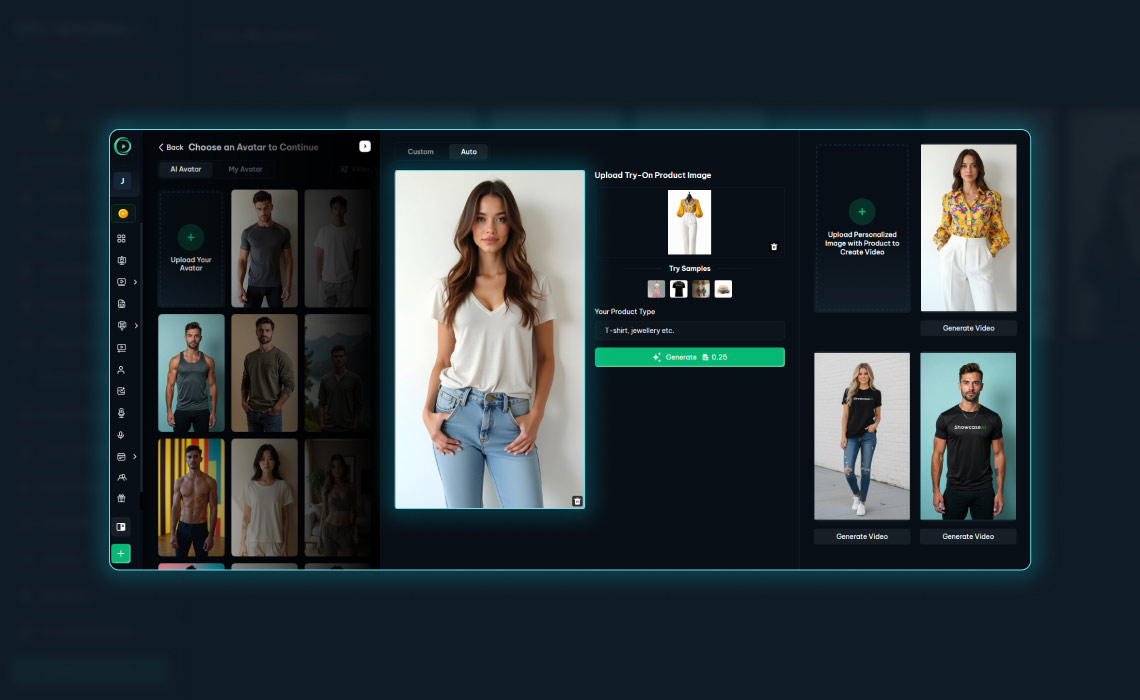
The system will now ask you to select a model.
ShowcaseAI provides a collection of realistic AI avatars designed for product marketing. These avatars act as digital models who will present your clothing naturally.
You may also upload your own model through the My Avatar section. Many brands prefer this option because it keeps their visual identity consistent across all products and campaigns.
At this point, you are not filming anyone. You are choosing a presentation model that will automatically wear the outfit in the video.
Step 3 — Select Creation Mode
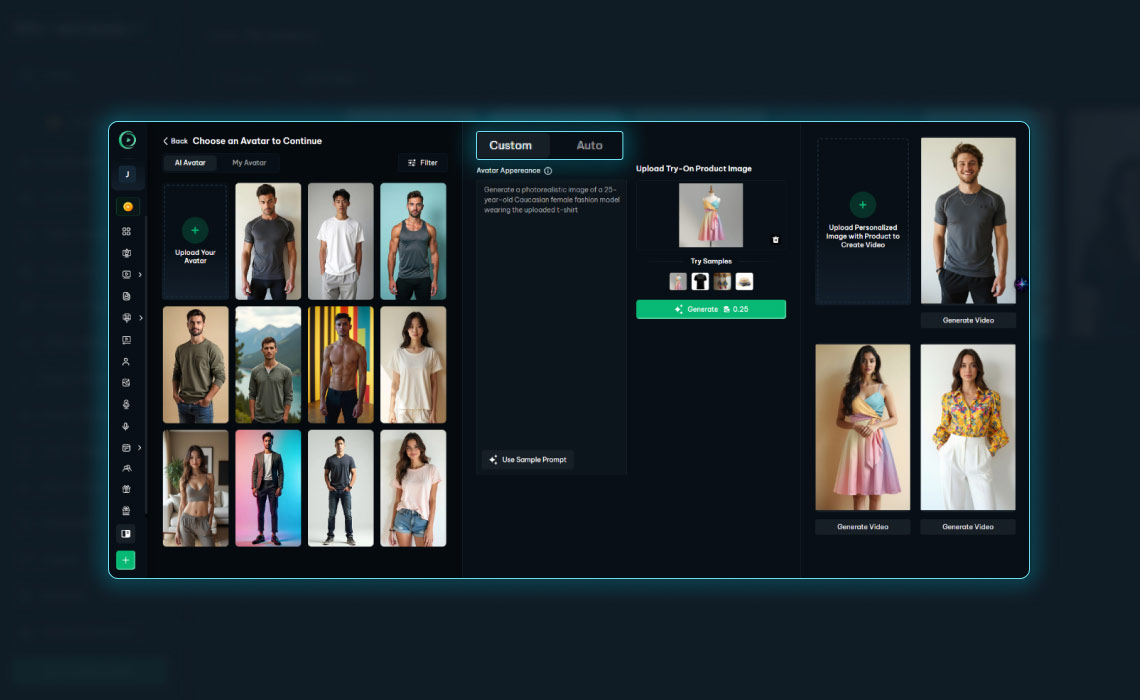
After selecting an avatar, you will see two working modes.
Auto Mode
Auto mode is simple and fast.
You only upload the clothing image and generate the preview. The system places the outfit on the avatar automatically.
This option is suitable for daily product uploads and quick marketing content.
Custom Mode
Custom mode provides more control.
You can adjust:
- Gender
- Facial appearance
- Style
This helps you match the model to your brand audience. For example, you may choose a casual style for streetwear or a refined style for formal clothing.
Both modes produce the same final quality. The difference is only the level of personalization.
Step 4 — Upload the Clothing Image
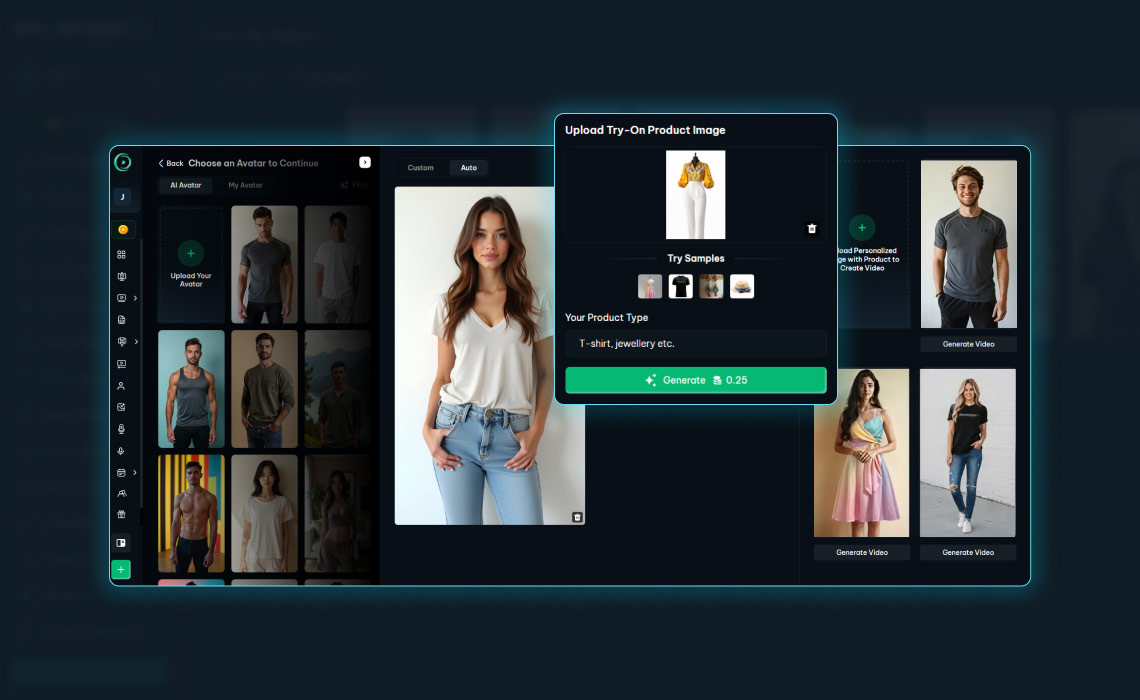
Next, upload an image of your clothing product.
The image becomes the base material for the virtual try-on process.
For best results, use:
- A clean background
- Good lighting
- A front-facing garment
- High resolution
Avoid wrinkles, shadows, or blocked areas. Clear images enable the AI to accurately detect garment edges and improve realism.
After uploading, the platform prepares the clothing automatically. You do not need to remove the background or resize the file.
Step 5 — Generate the Preview
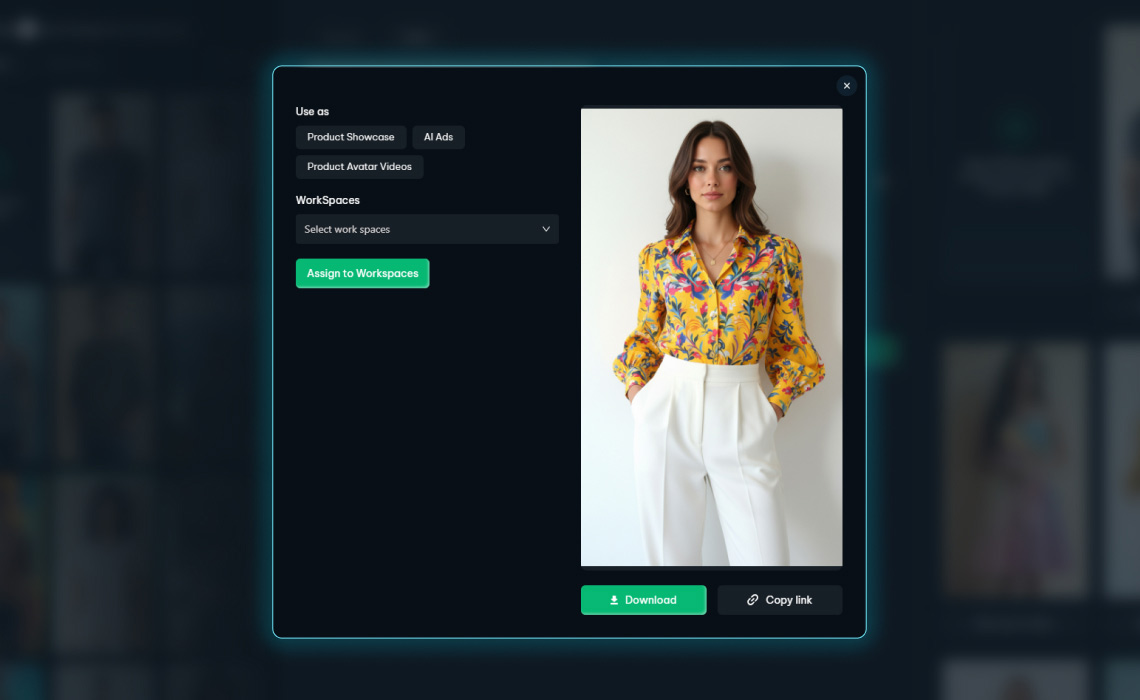
When the image is ready, click Generate Video.
ShowcaseAI fits the clothing onto the avatar and displays a preview.
Within a few moments, you will see how the outfit appears on a person. This step replaces a traditional photoshoot.
You may review the preview carefully. If needed, you can change the avatar or image and generate it again. Once satisfied, continue to the next step.
Step 6 — Choose the Video Type
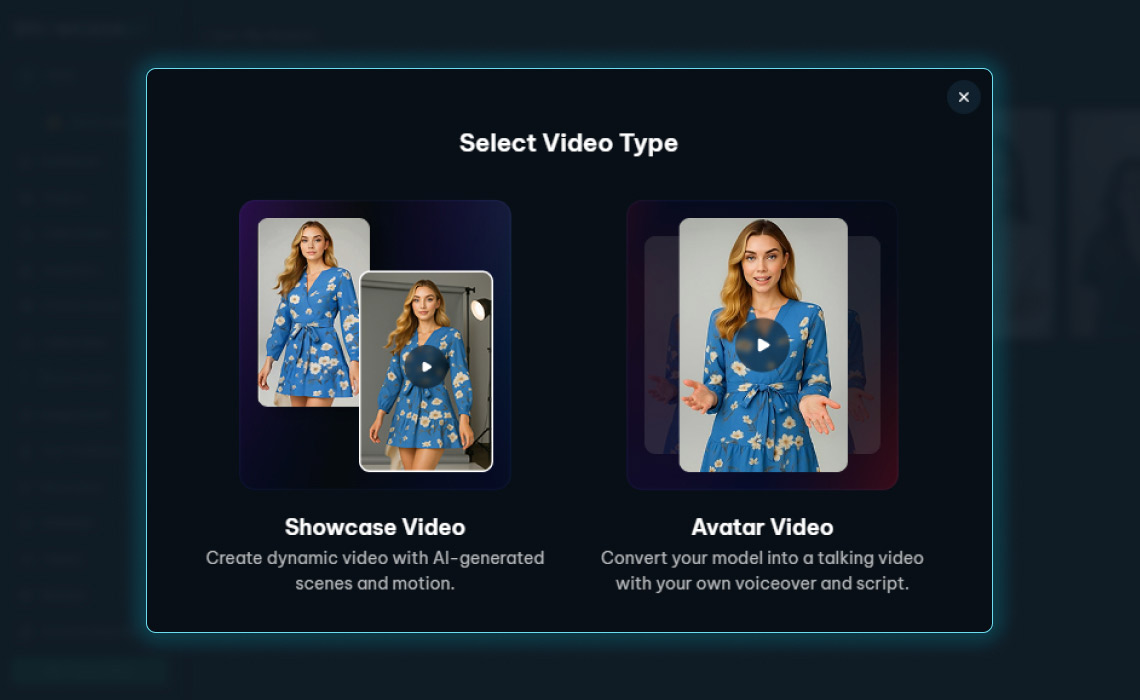
Now the system presents two video options.
Showcase Video
Creates a dynamic fashion modeling video.
This option focuses on visual presentation and product appearance.
Avatar Video
Creates a speaking video with voiceover narration.
This option is suitable for announcements and explanations.
For clothing promotion, choose Showcase Video.
It allows customers to observe the outfit clearly.
Step 7 — Add Script or Scene Prompt
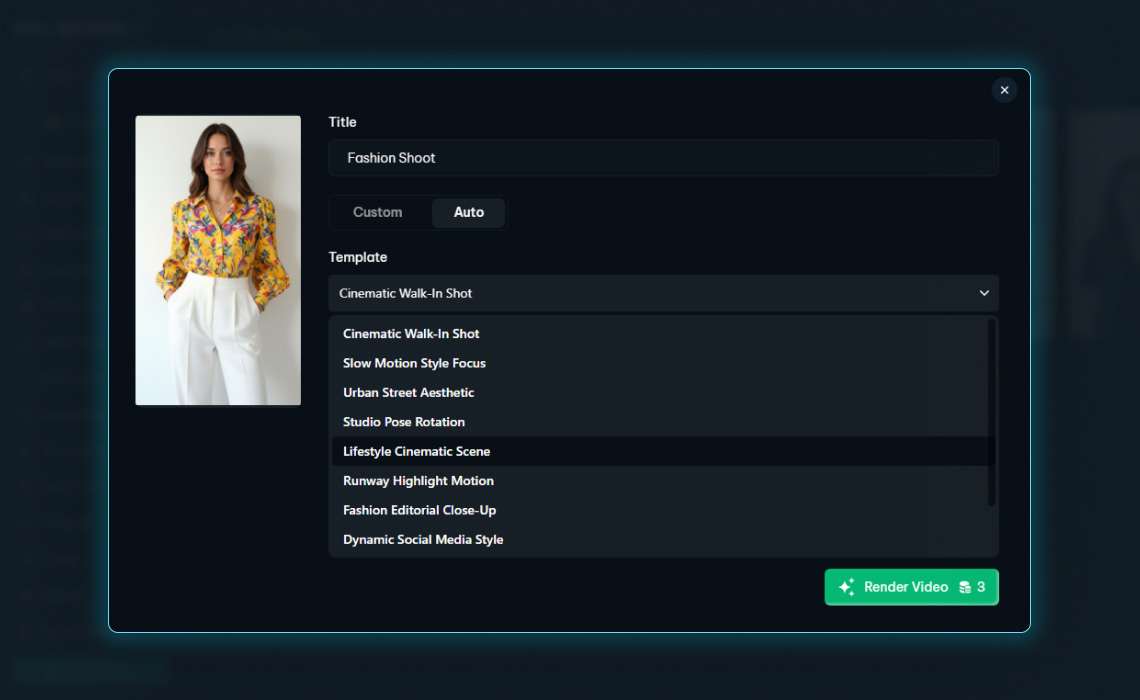
This section controls how your model presents the outfit in the video. ShowcaseAI offers both Custom mode and Auto mode for scene creation.
In Custom mode, you describe the environment using the Describe scene and environment for your Video field. You can define pose, background, lighting, camera movement, and mood. For example: “Male model walking confidently in a bright studio, soft lighting, slow camera zoom.” You may also click Get AI Idea to receive automatic scene suggestions and caption ideas that you can edit before rendering.
In Auto mode, you do not need to write a prompt. The platform provides ready-made scenes like Cinematic Walk-In Shot, Studio Pose Rotation, Urban Street Aesthetic, and Runway Highlight Motion. ShowcaseAI automatically applies animations and styling.
Step 8 — Add Background Music
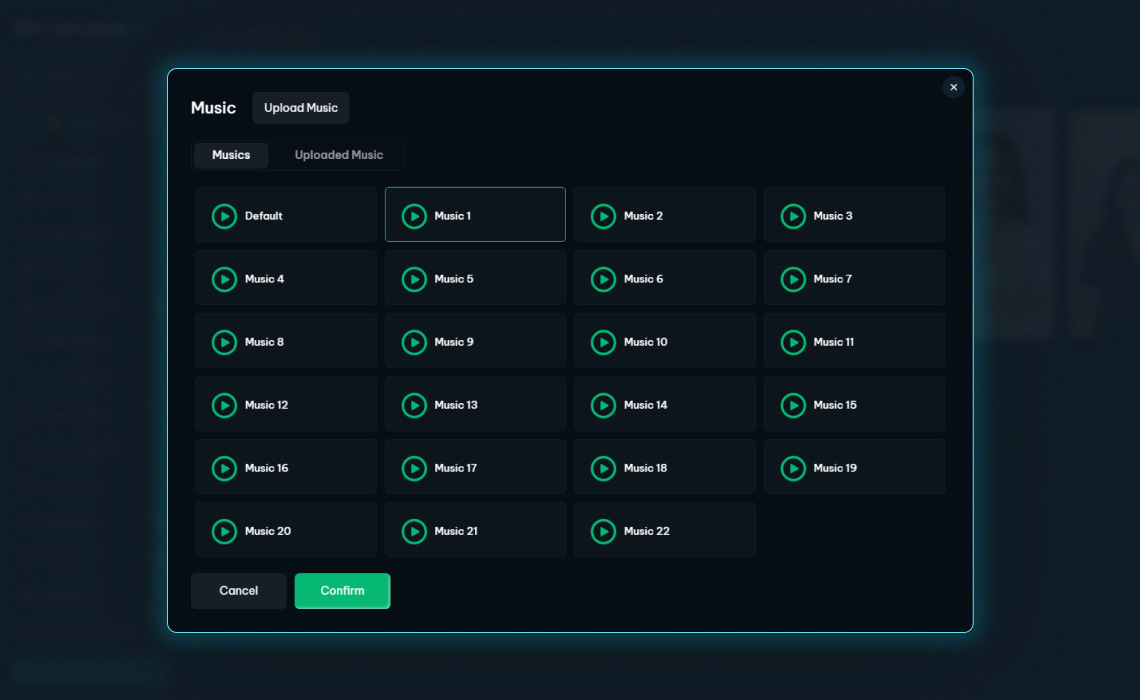
You can now add background music.
Music improves viewer engagement and makes the video more appealing.
You may choose a built-in track or upload your own audio. The platform synchronizes the sound with the visuals automatically. No manual editing is required.
Select music that matches the clothing style. Energetic tracks suit casual fashion, while calm tracks work better for formal wear.
Step 9 — Render the Final Video
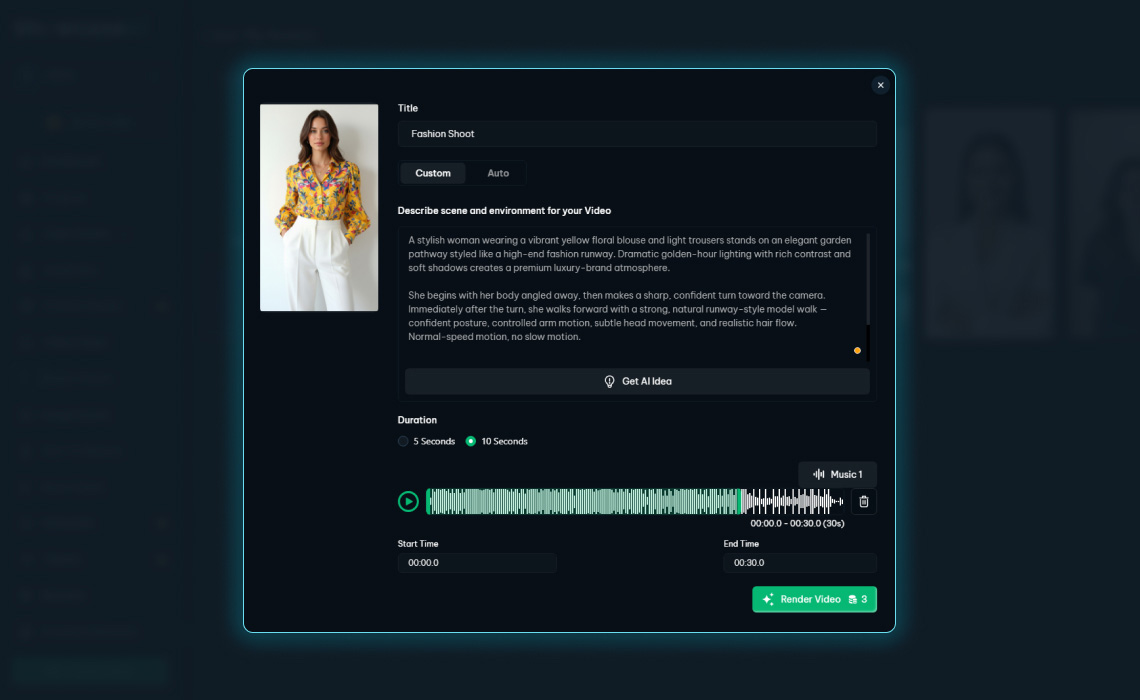
Finally, click Render Video.
The system combines the avatar animation, clothing preview, captions, and music into a complete marketing video. Rendering takes only a short time.
After completion, your video is ready to download and publish. You can repeat this workflow for every product in your catalog.
Where You Can Use the Video
The generated video works across many platforms.
You can upload it to:
- Instagram Reels
- Facebook advertisements
- TikTok posts
- YouTube Shorts
- Shopify product pages
- E-commerce listings
- Website banners
You may also share it directly through messaging platforms to reach customers quickly. One product image can now support multiple marketing channels.
Why This Workflow Is Important
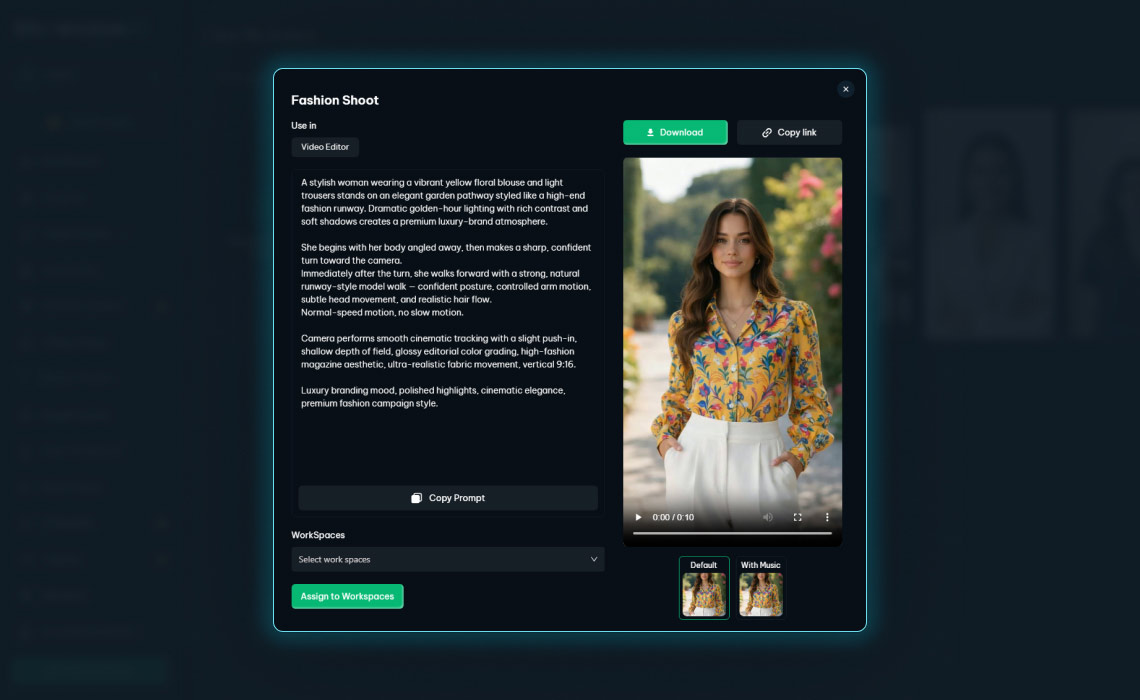
Fashion marketing depends on consistent visual content. Traditional production slows promotion because each item requires new photography and editing. As a result, stores cannot present every product properly.
Automated video creation changes this process. You can create a promotional video as soon as a new item is added. Frequent content keeps your store active and improves customer confidence.
When shoppers see clothing modeled realistically, they understand fit and style more clearly. This helps them make decisions faster and reduces hesitation.
Conclusion
Creating fashion videos once required models, cameras, and editing software. ShowcaseAI simplifies the entire process through AI avatars and guided automation.
You choose a model, upload the clothing image, preview the outfit, add captions and music, and render the video. The platform handles the presentation and animation automatically.
With this workflow, any clothing business can present products professionally and consistently. Every item can be introduced with a video instead of a static image, helping brands communicate clearly and compete effectively in modern e-commerce.